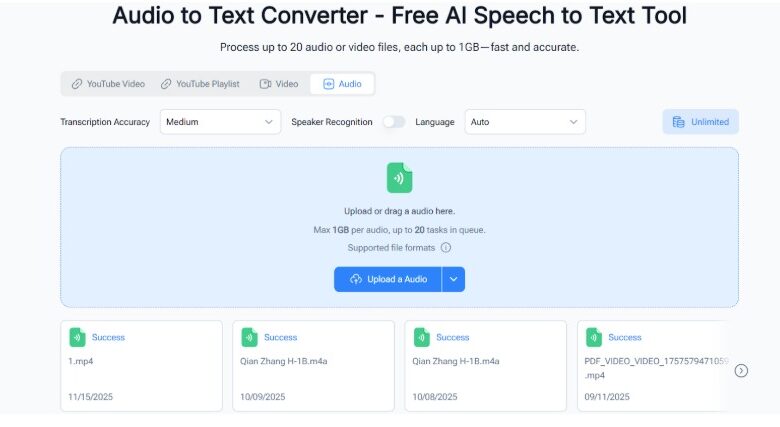
As a researcher, I’ve spent countless hours listening to interviews, focus groups, and lectures just to take notes or analyze key insights. It’s tedious, time-consuming, and often exhausting—especially when dealing with multiple recordings or lengthy sessions. That’s why NoteGPT has become a critical part of my workflow. Its Audio to Text Converter (https://notegpt.io/audio-to-text-converter) feature turns hours of audio into actionable, high-quality transcripts quickly, so I can focus on analysis rather than typing.
In this article, I’ll explore how NoteGPT supports academic and research workflows, why it’s effective for complex projects, and how it addresses common challenges in transcription.
The Challenges of Research Transcription
Lengthy Interviews and Lectures
Academic research often involves long recordings—one-on-one interviews, multi-hour focus groups, or full lectures. Manually transcribing this content is slow and prone to errors, leaving researchers frustrated and behind schedule.
Multiple Recordings Across Projects
Researchers typically handle several participants and sessions. Processing recordings one by one can create workflow bottlenecks, delaying analysis, publication, or project timelines.
Complex Audio Environments
Field recordings, online interviews, and multi-speaker discussions often include background noise, overlapping voices, and varying sound quality. Accurate transcription is critical for valid analysis.
Multi-Language Research
Studies involving international participants introduce additional challenges. Reliable transcription across different languages is essential to maintain the accuracy and integrity of the data.
How NoteGPT’s Audio to Text Converter Helps
Batch Transcription for Multiple Recordings
NoteGPT allows uploading multiple interviews or sessions simultaneously. Batch transcription means researchers can continue other tasks while transcripts are generated efficiently.
Large File Handling
Field recordings, seminar sessions, or full-day interviews can easily exceed typical file size limits. NoteGPT handles files up to 1GB, so even the longest recordings are processed without splitting or compressing.
Speaker Recognition for Accurate Attribution
Academic studies often include multiple participants. NoteGPT automatically identifies each speaker, making transcripts easier to follow and reducing errors in coding or analysis.
Adjustable Accuracy for Precision
Depending on the study, transcription precision is vital. The Audio to Text Converter lets researchers select high-accuracy mode for critical recordings, ensuring minimal manual corrections.
Multi-Language Support
Global studies require multilingual transcription. With support for 98+ languages, NoteGPT handles diverse datasets seamlessly, avoiding the need for extra tools.
Practical Academic Use Cases
Focus Groups
Focus group discussions produce dense conversational data. NoteGPT’s Audio to Text Converter accurately labels multiple participants, producing clean transcripts ready for qualitative analysis.
Interviews
Researchers can batch-process dozens of interviews in one go, saving hours of manual transcription. High-accuracy mode captures key statements and nuanced responses accurately.
Lectures and Seminars
Academic lectures can be transcribed in bulk, allowing students and research assistants to access readable notes immediately. SRT files provide timestamped references, while TXT files give clean text for summaries and analysis.
Conferences and Panels
Conference recordings with multiple speakers can be transcribed with speaker labels intact. Large file support allows full sessions to be processed without splitting, making research documentation easier.
Integrating NoteGPT into Research Workflows
Here’s a practical workflow using NoteGPT for research:
- Upload all recordings – multiple interviews, lectures, or focus group sessions in batch.
- Choose transcription settings – select high-accuracy for important data.
- Process large files – NoteGPT handles files up to 1GB without interruptions.
- Review speaker-labeled transcripts – ensure every participant’s contribution is clear.
- Export in SRT or TXT formats – SRT for video references or presentations, TXT for data analysis and note-taking.
- Analyze and summarize – transcripts are ready for coding, thematic analysis, or drafting research reports.
This approach minimizes manual effort and maximizes data usability.
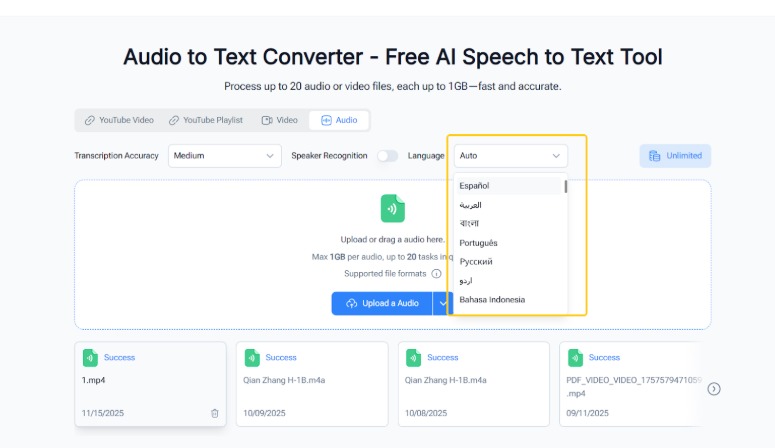
(NoteGPT Audio to Text Converter with Multi-Language Support)
Advantages for Academic Professionals
- Batch processing: Multiple recordings processed simultaneously save time.
- Large file support: Full-length sessions can be transcribed without splitting.
- Speaker labeling: Distinguish participants accurately in multi-speaker discussions.
- High precision: Maintains integrity of sensitive or nuanced data.
- Multilingual support: Handles international datasets efficiently.
- SRT and TXT outputs: Timestamped files for media, clean text for analysis.
These features make NoteGPT more than a transcription tool—it’s a reliable assistant for academic research.
Case Study: Qualitative Research Workflow
A research team conducting 30 one-hour interviews across three languages could follow this workflow:
- Record all sessions and store files digitally.
- Batch-upload recordings to NoteGPT.
- Use high-accuracy mode to ensure precision.
- Let the tool process large files automatically.
- Review transcripts with speaker labels for clarity.
- Export SRT files for presentations and TXT files for coding and analysis.
This process dramatically reduces manual transcription time, allowing the team to focus on interpreting results and generating insights.
Why NoteGPT Stands Out
While many transcription tools exist, NoteGPT’s Audio to Text Converter is tailored for research workflows:
- Handles large recordings without extra processing
- Supports batch uploads to speed up workflows
- Offers speaker recognition for multi-participant clarity
- Supports 98+ languages for multilingual projects
- Produces actionable SRT and TXT outputs for different research needs
It’s designed to reduce friction in transcription while maximizing accuracy and usability.
Conclusion
For researchers, academic professionals, and analysts, NoteGPT’s Audio to Text Converter offers a fast, reliable, and practical way to Convert Audio to Text (https://audioconverter.ai/) . Batch processing, large file handling, speaker labeling, and multilingual support remove common transcription challenges. With SRT and TXT outputs ready for immediate use, transcripts can be applied directly to presentations, reports, or data analysis. NoteGPT transforms transcription from a tedious task into an efficient, actionable step in the research process, allowing professionals to focus on insight, discovery, and high-quality analysis.