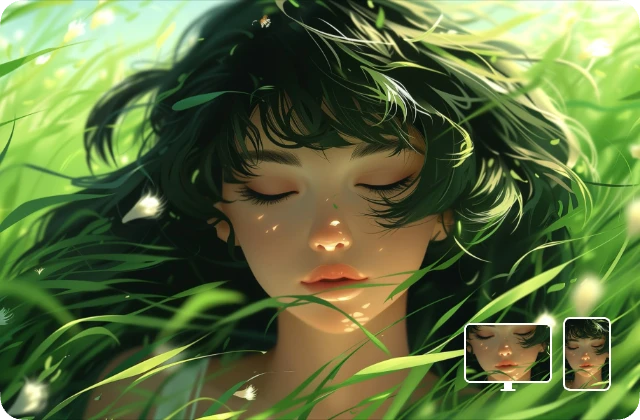
Anime wallpapers are a popular way to personalize desktops, mobile devices, and creative projects. The Anime AI Art Generator makes it easy to create stunning, high-quality anime wallpapers by combining AI-powered generation with user-friendly customization. Whether you want a serene landscape, a bustling city scene, or a character-focused composition, this tool allows you to generate beautiful anime scenes in minutes.
With the Anime AI Art Generator, both casual users and professional creators can produce wallpapers that feature complete scenes, detailed backgrounds, and well-integrated characters. Unlike simple image generators that focus on single characters, Anifun enables full scene creation, including props, lighting, and dynamic composition. This guide will walk you through the process of generating anime wallpapers, provide tips and inspiration to enhance your designs, and explain why Anifun is a top choice for wallpaper creation.
How to Generate Anime Wallpapers with Anifun
Creating a polished wallpaper requires understanding the workflow and options available in Anifun.
Step 1: Choose the Canvas Size and Aspect Ratio
- Open the Anifun Anime AI Art Generator
- Select a wide or ultra-wide aspect ratio suitable for your desktop or mobile wallpaper. Common ratios are 16:9 for monitors and 9:16 for phones.
- Tip: Picking the correct ratio ensures that your wallpaper fills the screen without cropping important elements.
Step 2: Select Models and Styles
- AI Models: Anifun offers 20 large models optimized for different anime aesthetics, from cel-shaded to painterly styles.
- Style Loras: Users can overlay hundreds of style Loras for effects like classic anime, retro, chibi, or fantasy settings.
- Tip: For vibrant wallpaper scenes, combine a model that emphasizes background details with a style Lora that enhances color and texture.
Step 3: Input Scene Prompts
- Describe the scene using detailed prompts, including characters, environment, props, and lighting.
- Example: “Sunset on a cherry blossom hill, two anime characters in traditional kimono, soft lighting, petals falling.”
- Tip: Including specific time of day, atmosphere, and emotion helps the AI generate cohesive and visually appealing wallpapers.
Tips for Stunning Anime Wallpapers
Even with AI assistance, following these tips and exploring theme inspirations can help your wallpaper stand out.
mitsuri wallpaper made by Anifun
nezuko wallpaper made by Anifun
Focus on Scene Composition
- Arrange characters and objects naturally within the scene.
- Tip: Use prompts like “foreground, middle ground, background” to guide spatial depth.
Experiment with Lighting
- Lighting sets the mood. Golden hour, night lights, or magical glows can transform a scene.
- Tip: Specify the lighting style, e.g., “soft sunrise light” or “neon city lights.”
Include Dynamic Elements
- Movement like falling leaves, rain, or sparkles adds life to wallpapers.
- Tip: Use descriptive terms like “blowing hair,” “fluttering petals,” or “floating lanterns.”
Use Layered Style Loras
- Apply multiple style Loras to achieve rich textures and artistic flair.
- Tip: Combine one Lora for background enhancement and another for character detailing.
Refine Through Iteration
- Generate multiple versions and pick the best one.
- Tip: Adjust your prompts gradually to perfect color balance, composition, and focus.
Background Details Matter
- Detailed backgrounds make wallpapers more immersive.
- Tip: Specify elements like mountains, cityscapes, interiors, or fantasy worlds.
Wallpaper Theme Inspirations
To spark creativity, here are some theme ideas for your anime wallpapers:
- Nature and Landscape – Cherry blossom scenes, mountain views, or fantasy forests with glowing plants.
- Urban and Modern – Neon-lit city streets, rooftop views at sunset, or cozy café interiors.
- Seasonal and Weather Themes – Rainy days with umbrellas, snowy winter streets, autumn leaves falling.
- Fantasy and Sci-Fi – Magical worlds, floating islands, futuristic cities, or steampunk settings.
- Character-Focused Themes – Action poses, expressive portraits, or group scenes with multiple characters.
- Artistic and Style Experiments – Retro 90s anime, watercolor painterly style, or chibi/kawaii designs.
💡 Tip: Combine these themes with Anifun’s models and style Loras for unique results. For example, a cherry blossom scene can be paired with a retro anime style Lora for nostalgic charm.
Advantages of Using Anifun for Anime Wallpapers
Anifun offers unique features that make it ideal for creating high-quality anime wallpapers.
Free and Unlimited Creations
- Users can generate as many wallpapers as they like without restrictions.
- Tip: Explore different styles and prompts freely to find the perfect combination.
High-Resolution Outputs
- Create wallpapers suitable for desktop monitors, 4K screens, or mobile devices.
- Tip: Use the upscaler to increase resolution for larger displays without losing quality.
Image Reprocessing Features
- Supports background removal, image upscaling, and style/filter conversion.
- Tip: Reprocess generated images to adjust color tones, atmosphere, or style.
One-Click Sharing and Export
- Download wallpapers in multiple formats for immediate use.
- Tip: Share creations on social media or use them directly as wallpapers.
Versatile Style Options
- With 20 models and hundreds of style Loras, you can create diverse wallpapers: fantasy, retro, slice-of-life, or modern cityscapes.
- Tip: Mix and match styles for unique compositions that fit your aesthetic.
Conclusion: Anifun Makes Anime Wallpaper Creation Simple
For anyone looking to generate high-quality anime wallpapers, Anifun Anime AI Art Generator is an outstanding choice. Its intuitive interface, extensive model and style library, free unlimited usage, high-resolution output, and image reprocessing capabilities empower users to create visually stunning and fully customizable anime scenes. Whether for personal desktops, mobile backgrounds, or creative projects, Anifun ensures your anime wallpapers look professional, vibrant, and captivating.